EF Commander 7.65
Updated on 30 Aug 2011
By Anthony Buckner
By Anthony Buckner
Specifications
License:
Shareware
Updated:
Downloads:
9401
Platform:
Win95,Win98,WinME,WinNT 4.x,Windows2000,WinXP,Windows2003,Windows Vista Starter,Windows Vista Home Basic,Windows Vista Home Premium,Windows Vista Business,Windows Vista Enterprise,Windows Vista Ultimate,Windows Vista Home Basic x64,Windows Vista Home Prem
Publisher:
EFSoftware(more)
Website:
User Reviews:
Other versions:
7.61, 7.56, 7.55
Do you like
EF Commander?
EF Commander?
FindMySoft Editor's Review
EF Commander – Complex and Multi-featured File Manager
You can do a lot of things with the Microsoft-developed operating system. For example you can watch videos, images and manage all the files you store on your drives. Microsoft took this into consideration and delivers Windows with features that should help you out. To watch videos, Windows comes with a built-in media player, the aptly named Windows Media Player. To watch images, Windows comes with Windows Picture and Fax Viewer (XP), Windows Photo Gallery (Vista) or windows Photo Viewer (Windows 7).
What about managing files? Well, to help you manage all the files you stored on your computer, the Microsoft-developed operating system comes with Windows Explorer. It is the default file manager that comes built-into the Windows operating. It is not such a brilliant solution when it comes to properly efficient file management. That is why there are a myriad of file managers out there.
Out of all the file managers available for download online, I would like to focus on a complex and multi-featured file manager called EF Commander. This EFSoftware-developed piece of software has something to offer to all types of users, from novice computer users up to advanced computer users that want a single interface to manage numerous tasks.
Downloading the software will take but a moment, since it weighs in at under 4MB. Installing it on your Windows-powered computer will also take but a moment since all you have to do is launch the setup executable and follow the installation wizard. Speaking of the Windows operating system, EF Commander works with the now outdated Windows XP operating system, works with Windows Vista, and it also works with the latest iteration of the Microsoft-developed OS, Windows 7.
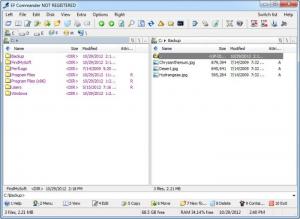
Once installed on your system, you have view file management application that provides a dual, tabbed view of yor files. At the top there’s a bunch of buttons that do various tasks, and tabs that take you to view all your drives. At the bottom are displayed the most tasks you use most often to manage your files (view, edit, copy, delete, etc) and their assigned shortcut (for example to delete a file or folder you can press F8).
You can perform a wide range of tasks with EF Commander. You can view videos and listen to music since it comes with a built-in media player. You can batch rename files thanks to a built-in tool that does just that – rename multiple files at the same time. You can create compressed archives, you can download/upload files from FTP servers, you can burn data onto disks (can be done from within EF Commander but requires a Nero Burning Rom), and a whole lot more.
A multi-featured application that brings all the tools you need for file management under one easy to use interface.
Pros
Cons
What about managing files? Well, to help you manage all the files you stored on your computer, the Microsoft-developed operating system comes with Windows Explorer. It is the default file manager that comes built-into the Windows operating. It is not such a brilliant solution when it comes to properly efficient file management. That is why there are a myriad of file managers out there.
Out of all the file managers available for download online, I would like to focus on a complex and multi-featured file manager called EF Commander. This EFSoftware-developed piece of software has something to offer to all types of users, from novice computer users up to advanced computer users that want a single interface to manage numerous tasks.
Downloading the software will take but a moment, since it weighs in at under 4MB. Installing it on your Windows-powered computer will also take but a moment since all you have to do is launch the setup executable and follow the installation wizard. Speaking of the Windows operating system, EF Commander works with the now outdated Windows XP operating system, works with Windows Vista, and it also works with the latest iteration of the Microsoft-developed OS, Windows 7.
Once installed on your system, you have view file management application that provides a dual, tabbed view of yor files. At the top there’s a bunch of buttons that do various tasks, and tabs that take you to view all your drives. At the bottom are displayed the most tasks you use most often to manage your files (view, edit, copy, delete, etc) and their assigned shortcut (for example to delete a file or folder you can press F8).
You can perform a wide range of tasks with EF Commander. You can view videos and listen to music since it comes with a built-in media player. You can batch rename files thanks to a built-in tool that does just that – rename multiple files at the same time. You can create compressed archives, you can download/upload files from FTP servers, you can burn data onto disks (can be done from within EF Commander but requires a Nero Burning Rom), and a whole lot more.
A multi-featured application that brings all the tools you need for file management under one easy to use interface.
Pros
- Easy to use
- Numerous set of tools
- Extensive language support
- Works with XP, Vista and Windows 7
Cons
- Shareware (free to use during the 30-day trial period)
- Nag screen
System Requirements
Typical Windows Installation
Do you like EF Commander
Advertising
Popular News
The soon to be released Samsung Galaxy S3 is shaping up to be an event bigger commercial success than its predecessor, the Samsung Galaxy S2
Linux fans once again have the chance to take part in the annual Linux Foundation T-Shirt Design Contest, now in its 3rd edition
EF Commander Awards
EF Commander Editor's Review Rating
EF Commander has been reviewed by George Norman on
12 Mar 2010. Based on the user interface, features and complexity, Findmysoft has rated
EF Commander
4
out of 5 stars, naming it ExcellentYour Rating
Top Downloads
2.
Opera5.
Trillian8.
AIM9.
Skype10.
Ad-Aware12.
Nero13.
Google Earth14.
Picasa15.
Winamp16.
iTunes17.
RealPlayer18.
uTorrent19.
eMule20.
WinRAR21.
BitComet22.
WinZip23.
Shareaza24.
CCleaner25.
Recuva26.
Tweak UI27.
CuteFTP Home29.
Adobe Reader30.
NewsPiperBecome A Fan!
Link To Us!
EF Commander
HTML Linking Code
HTML Linking Code
Latest Reviews